You know that moment when you finally decide to try a new mobile games, hit “install,” and your phone instantly tells you there’s not enough space? Yeah. That’s the moment a lot of us quietly give up and go back to scrolling.
The good news is, you don’t really need to install anything anymore. Browsers have gotten so good that you can play actual, fun games right inside Chrome or Safari on your phone no app store, no signup, no waiting around for a giant download to finish. I’ve been bouncing between these for a while now, and honestly, for casual play, they’ve replaced most of my installed games.
So What Counts as a “No-Download” Game?
It’s exactly what it sounds like: a game that lives on a website. You open the page, the game loads in your browser, and you play. People call them browser games, HTML5 games, or instant-play games depending on who’s writing about them.
Behind the scenes, modern web tech (HTML5, WebGL, that kind of thing) has gotten powerful enough to run real games not just the clunky Flash stuff from a decade ago. Some of them genuinely look and feel as polished as anything on the App Store. The browser game industry is on track to be worth around $35 billion by 2027, which tells you this isn’t a niche thing anymore.
Why Bother Going Browser Only?
A few reasons stand out, especially on mobile.
The storage thing is the obvious one. If your phone is constantly screaming at you to delete photos, browser games barely register. They use a few megabytes at most.
Then there’s the speed. You tap a link and you’re playing in two seconds. Compare that to downloading a 500MB game over hotel Wi-Fi and questioning your life choices.
You also get cross-device freedom. Start a puzzle on your phone during your commute, finish it on your laptop later. Nothing’s locked to one device.
And here’s something most people don’t think about: browser games are actually safer than installed apps in a lot of ways. They run in a sandbox, which means they can’t dig around in your contacts or photos the way some sketchy app might.
The Sites Worth Bookmarking
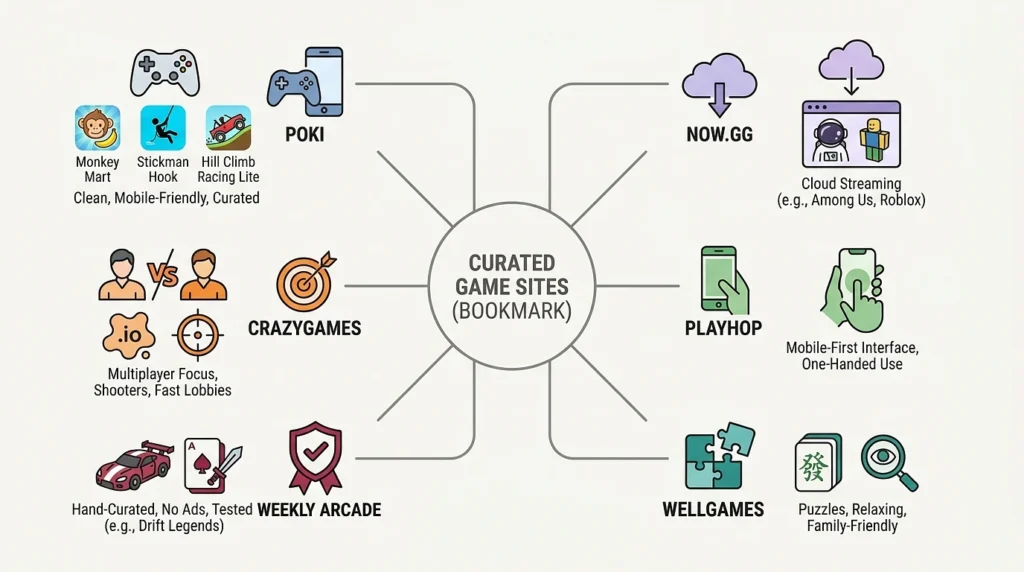
I’ve tried a lot of these. Most are mediocre. A handful are genuinely good. These are the ones I keep coming back to.
- Poki is probably where I’d send a friend first. It’s clean, it works beautifully on phones, and the games are properly curated instead of being a dumping ground for clones. Monkey Mart is the one that hooked me you run a little supermarket, stock bananas, keep customers happy, and somehow an hour disappears. Stickman Hook and Hill Climb Racing Lite are also solid picks if you want something more action-y.
- now.gg is doing something different and kind of wild. It streams full mobile apps from the cloud, so you can play things like Among Us or Roblox in your browser as if they were installed except they’re running on a server somewhere and just being beamed to your phone. If you’ve got a decent connection, it works surprisingly well.
- CrazyGames is the one I open when I want a quick multiplayer match. It’s heavy on
.iogames and shooters, and the lobbies fill up fast. - Playhop is worth a look if you mostly play on your phone. The interface is built for one-handed use, which sounds like a small thing until you’ve fought with a desktop-first site on a 6-inch screen.
- Weekly Arcade is a smaller, hand-curated collection. No ads, no signup, every game gets actually tested before it goes up. Drift Legends a 3D racer that runs in the browser is the standout. Their Solitaire Roguelite is also weirdly addictive.
- WellGames leans more toward puzzles, mahjong, hidden object games, that kind of thing. Good for kids, good for parents, good for unwinding without anyone shooting at you.
The Actual Games to Try First
If you don’t want to dig through libraries, here’s a shortlist by mood.
When you want to think a little: 2048 is still great after all these years. Wordle if you haven’t somehow already played it. Color Sort sounds boring you sort liquid into tubes but the first time you get stuck on level eight you’ll understand.
When you want to react fast: Snake (the Nokia one, basically), Flappy Wings if you enjoy suffering, Stack Tower for something more chill.
When you want to play with friends: Slither.io and Agar.io are the classics. Doodle Duel is great if your group likes drawing games it handles up to 30 people. Gartic Phone is pure chaos and I recommend it at every gathering. GeoGuessr Battle Royale if your friend group has That One Person who’s weirdly good at geography.
A Few Things That Make the Experience Way Better
Some of this is small, but it adds up.
Use a current browser. Chrome and Safari are both fine. Older browsers will stutter on anything 3D.
Save your favorite sites to your home screen. Both iPhones and Androids let you do this it shows up as an icon, opens in full screen, and basically feels like an app. You’re getting most of the benefit of a real app without actually installing one.
Flip your phone sideways for racing or arcade games. Most are designed for landscape, even if they technically work in portrait.
If a game stutters, close your other browser tabs. Browser games share memory with everything else you’ve got open, and twenty Reddit tabs in the background will absolutely hurt performance.
And if a game is really ad-heavy on one site, search for the same title elsewhere. Big games like 2048 or Snake exist on dozens of sites, and the cleaner versions are usually on the bigger platforms.
Are These Things Actually Safe?
For the most part, yes. More than installed apps, in some ways.
Your browser keeps games sandboxed, so they can’t poke around in your phone’s files or your camera or your contacts unless you specifically grant permission. They also can’t install background services that quietly chew through your battery.
That said, use some common sense. Stick to known platforms the ones I listed above are all legitimate. Make sure the URL starts with
https://(the little padlock icon in your address bar). And if a site suddenly tries to convince you your phone has 47 viruses and you need to download a “cleaner,” close that tab immediately. That’s not a real thing.
Most of these sites don’t require an account at all. If one is asking for your email and password before you can even start a game, that’s a red flag, not a normal step.
Quick answers to stuff people ask
Do these work on iPhones?
Yes. Everything on this list works in mobile Safari.
Will I lose my progress?
Most games save automatically in your browser. If you clear your browsing data, you’ll lose it unless you made an account on that site.
Can I play with friends?
Yep, and it’s actually easier than with installed apps. You just send them a link.
Do they eat a lot of mobile data?
Not really. A typical browser game uses 2–5 MB to load. Cloud-streamed stuff (like games on now.gg) uses more closer to streaming a video so save those for Wi-Fi.
Are these as good as App Store games?
For casual stuff, often yes. For graphically demanding AAA games, native apps still win unless you’re using cloud streaming. But honestly? Most people aren’t playing AAA games on their phone anyway.
Can I play offline?
Some idle games and puzzles work offline once they’ve loaded. Anything multiplayer or streamed needs an internet connection.
So Where Do You Actually Start?
If you take nothing else from this, just open Poki on your phone right now. Play one round of Monkey Mart. See what you think. Five minutes from now you’ll either be hooked or you’ll have a much clearer sense of what genre to look for next.
Browser gaming has quietly become really good while everyone was busy fighting their phone storage. It costs nothing, doesn’t ask anything of you, and if you don’t like a game you just close the tab. There’s no friction at all.
Worst case, you waste fifteen minutes. Best case, you find your new go-to time killer and never download a mobile game again.